![tns_logo (1).png]](https://support.tchatnsign.com/hs-fs/hubfs/tns_logo%20(1).png?width=40&height=40&name=tns_logo%20(1).png)
Reading time: ⏱️ 2 min
Sometimes the automatic sync between Tchat N Sign and OneSpan does not trigger properly. The result: your signature request appears stuck. The "Sync with OneSpan" button fixes this in one click.
When to use this feature?
Use the "Sync with OneSpan" button whenever you notice one of these situations:
- Your signature request status does not match reality (e.g. your clients signed but the status still shows "In progress")
- Downloaded documents do not have the signature fields filled in
- The "Retrieving audit..." message stays on screen
How to do it?
- Go to the signature module
- Open the affected signature request
- Click "Sync with OneSpan" in the top right corner of your screen
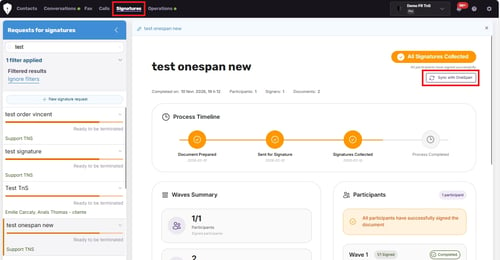
The system will:
- Update the signature request status
- Retrieve the documents with signature fields filled in
- Retrieve the signature audit
Best practice
➢ Bookmark this article. The "Sync with OneSpan" button should be your first reflex whenever a signature appears stuck - stay autonomous and keep your files on track.
If your signature request is still blocked after clicking "Sync with OneSpan", fill out our technical support form with the exact signature's title and our team will take care of your case.