![tns_logo (1).png]](https://support.tchatnsign.com/hs-fs/hubfs/tns_logo%20(1).png?width=40&height=40&name=tns_logo%20(1).png)
Reading time: ⏱️ 2 min
Tchat N Sign can automatically archive your activities in Equisoft based on their type. This feature improves traceability and simplifies audits by confirming that exchanges have been properly recorded. For each activity category, you can choose whether to enable or disable archiving based on your workflow.
1. Open settings
Click the ⚙️ gear wheel in the top right corner of your screen, then click Settings.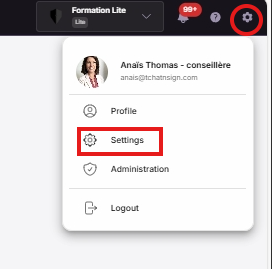
You will be redirected to all available settings options.
2. Access Equisoft settings
Click 🔗 Integrations & Connections, then click 📄 Equisoft.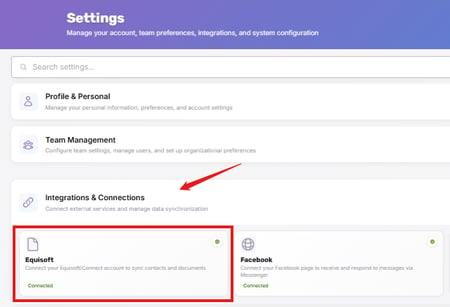
3. Disable the relevant activities
You will see a list of all configurable activity categories:
Signature request
External recipient activities
Operation event
Phone recording event
Conversations
Click the 📆 Activities tab to the right of the Connection and Sync tab.
Click Enabled to stop that activity from appearing in your archives.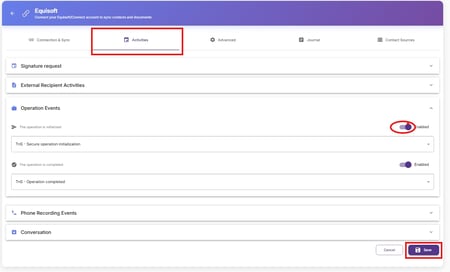
➢ You can configure each category independently — one can be enabled while another is disabled.
⚠️ Don't forget to click 💾 Save in the bottom right corner of your screen before leaving the page.
The change applies immediately to your future archives. You can update your preferences at any time by following the same steps.
Best practice: test after disabling
To confirm the change is in effect, perform a test action corresponding to the disabled category.
➢ Then open your Equisoft and verify that no new activity was created.
This lets you see the concrete difference in behavior before and after disabling the feature.