![tns_logo (1).png]](https://support.tchatnsign.com/hs-fs/hubfs/tns_logo%20(1).png?width=40&height=40&name=tns_logo%20(1).png)
CC : English subtitles avalable
Signing in to Tchat N Sign with a text-message code is going away. A code can be intercepted or handed to a fake site, which relays it to the real one in a fraction of a second.
Instead, you choose: a passkey, your Microsoft account or your Google account. You set it up once.
⏱️ Reading time: 3 min
Add a passkey
This is the fastest and safest option. It is never displayed and nobody can ask you for it. On a fake site, your device has nothing to offer.
- Click the gear icon at the top right, then Settings.
- Open Security & Privacy, then Multi-factor authentication.
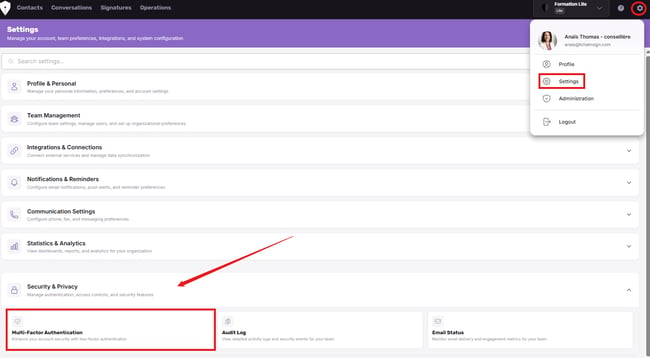
- In the Passkey section, click Add a passkey.

- Your device or password manager offers to save the key. Confirm with Save.
✅ The key appears under Your passkeys, marked Connected.
Or link your Microsoft or Google account
- On the same page, in the Connected accounts section, click Link Microsoft or Link Google.
- Sign in to your account and accept.
✅ The account shows Connected. The Unlink button removes it.
Sign in next time
On the sign-in screen, choose:
➢ Sign in with a passkey, then select your key and confirm with your face, fingerprint or device PIN
➢ Continue with Microsoft or Continue with Google
No code to type, no text to wait for.
Secure your Microsoft or Google account
If you sign in with Microsoft or Google, that account becomes the front door to all your files. Check three things.
➢ Remove text messages as a two-step verification method. Add a passkey to that account instead.
➢ Check your recovery options. An old phone or the email of someone who left the firm should no longer be listed.
➢ Turn on two-step verification if your account is protected by a password only.
One user per person
A passkey is tied to one person and one device. Two people can no longer share the same Tchat N Sign user.
This is also what Law 25 expects: being able to say who viewed which file and who sent which signature request.
✅ With the Lite plan, adding a user is free.
Still need help?
Join a technical support session. No booking needed: click the link at the time shown and you join us directly.
➢ Every Monday, 12 to 1 p.m.
➢ Every Wednesday, 3 to 4 p.m.
A question that can wait? Send us a support request. We reply within 24 business hours.